An image gallery can be perfectly clear to a visitor and surprisingly ambiguous to software. We see a collection of photographs, recognize its subject and understand that the pictures belong together. A machine encounters a web page containing text, links, image files, navigation and perhaps a video player. Schema.org structured data gives the publisher a way to describe those relationships explicitly. There are dedicated types for this: ImageGallery for a page presenting a collection of photographs or illustrations, and MediaGallery for a broader collection that mixes images, videos and other media. Choosing between them starts with a simple editorial question: what is this page actually presenting?
Both types belong beneath CollectionPage in the Schema.org hierarchy. CollectionPage is a general description of a web page that brings together a collection of things. MediaGallery narrows that idea to a collection of media, and ImageGallery narrows it further to an image gallery. That inheritance matters because the more specific type retains the broader meaning. A page identified as ImageGallery is already a kind of MediaGallery and CollectionPage; there is usually no reason to repeat the entire chain as separate declarations just to make the point more emphatically. Specificity should clarify the content, rather than make the markup noisier.
For a conventional image gallery, ImageGallery is usually the natural choice. Think of a collection of street photographs from Catania, a selection of architectural details, a botanical picture archive or a portfolio of abstract illustrations. The page exists primarily so that people can browse those pictures as a group. Its title and description should explain that collection in ordinary language, while its structured data identifies the page as a gallery. The schema does not depend on whether the photographs appear in a masonry grid, a slideshow or a simple vertical sequence. Those are presentation decisions. The underlying identity of the page stays the same.
MediaGallery fits when the collection genuinely spans different media. A wedding gallery might combine photographs with short films, while an exhibition archive could bring together installation photographs, a recorded artist interview and audio commentary. Calling either page MediaGallery describes the collection more accurately than treating everything as a photograph. An incidental embedded video does not necessarily require relabeling an otherwise photographic page, though. The useful question is whether mixed media define the collection, rather than whether a second file format happens to appear somewhere below the introduction.
The next distinction is the one that causes most confusion: ImageGallery describes the page, while ImageObject describes an individual image. A gallery containing twenty photographs can have one gallery page entity and twenty image entities. Each ImageObject can identify the actual image file through contentUrl and provide a name, description, caption, width, height, creator and relevant rights information. The gallery and its images can be connected through relationships such as hasPart. Where an explicit ordered collection is useful, an ItemList can describe the sequence. The important thing is to model the relationship consistently, so the photographs are identifiable members of the collection rather than unrelated fragments of metadata.
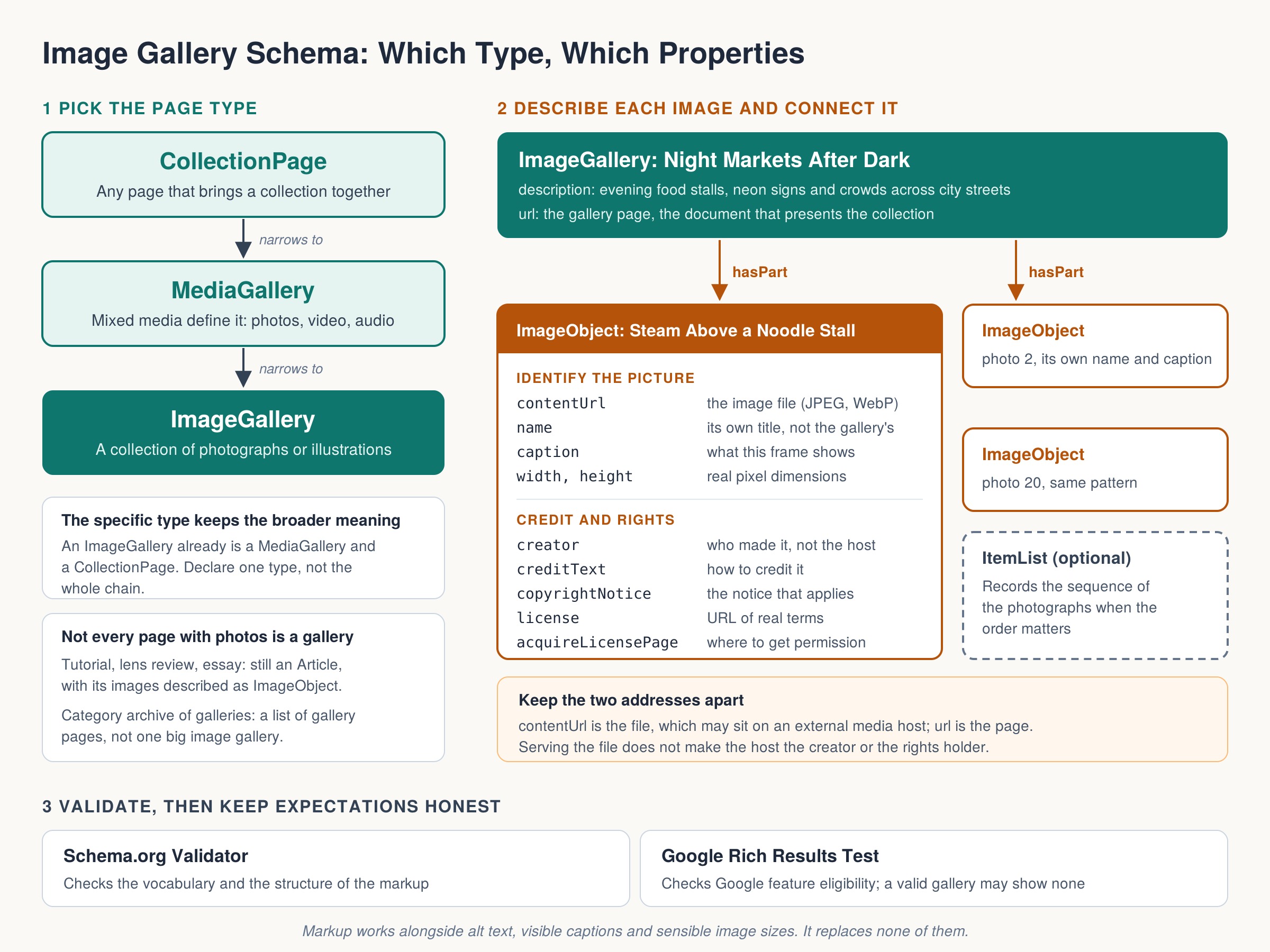
Imagine an image gallery called Night Markets After Dark. At page level, its description explains that the collection follows evening food stalls, neon signs and crowds across several city streets. One photograph within it might be named Steam Above a Noodle Stall, with a caption describing the vendor and the illuminated steam rising through the frame. The page description and photograph caption do different jobs. Repeating the gallery title as every photograph’s name wastes that distinction, rather like labeling every drawer in a cabinet simply ‘cabinet.’ Individual images deserve individual information where that information is available.
An image file address and the address of its surrounding page also need careful handling. The contentUrl of an ImageObject points to the image itself, such as a JPEG or WebP file. A gallery page URL points to the document in which the collection is presented. If a photograph has its own dedicated viewing page, that page can be identified separately and connected to the image. This becomes especially useful when files are hosted on another domain. A gallery can display images supplied by an external media host, but its metadata should still distinguish the file location, the publishing page, the photographer and the rights holder. The host is not automatically the creator merely because its server delivers the picture.
Rights information is one of the more practical reasons to describe individual images carefully. ImageObject supports properties including creator, creditText, copyrightNotice, license and acquireLicensePage. These cover different facts: who made the image, how it should be credited, what copyright notice applies, what license governs its use and where someone can obtain permission or a license. A license URL should lead to real terms applicable to that image. It should not be added as decorative SEO furniture. Likewise, describing an image in structured data does not grant visitors permission to reproduce it, and using an openly licensed vocabulary does not make the photograph openly licensed.
The phrase ‘schema for SEO’ can encourage expectations that the markup cannot fulfill. ImageGallery is a recognized Schema.org type, but that does not promise a special Google gallery carousel, higher rankings or more image-search traffic. Search engines decide which structured data they use and which features they support. Google’s image metadata documentation specifically supports attribution and licensing information for images, which is a more concrete opportunity than assuming that a gallery label will unlock a new search appearance. A valid description helps machines interpret a page; the page still needs useful content, accessible images, sensible navigation and a technically sound delivery system.
Structured data also does not replace the information people actually encounter. Alt text belongs in the image’s HTML and helps communicate its meaning when the picture cannot be seen. A visible caption can supply context, identify a location or explain why the photograph matters. File dimensions and appropriate image sizes help the browser display the gallery efficiently. These functions overlap with metadata in places, but none disappears because an ImageObject exists. I would fix missing captions, inaccessible controls and oversized downloads before celebrating a flawless schema report. A gallery that explains itself beautifully to a validator but frustrates its visitors has its priorities upside down.
Not every page with several photographs should be labeled ImageGallery. A tutorial about exposure, a review of a camera lens or an essay about wedding photography is still primarily an article when the text provides the main experience. Its photographs can be described as ImageObject entities without changing the page’s editorial identity. Similarly, a category archive containing links to many galleries is a collection of gallery pages, rather than necessarily one large image gallery itself. Structured data should follow the content’s purpose. Choosing a type because the keyword sounds attractive is a poor substitute for identifying what the visitor came to do.
In WordPress, implementation often involves an SEO plugin, a gallery plugin, a theme or a small custom integration that outputs JSON-LD. Before adding anything, inspect what those components already generate. An existing WebPage entity can be refined to ImageGallery where appropriate, while image entities should use stable identifiers and consistent relationships. Independent snippets that disagree about the same page create unnecessary maintenance work. After implementation, the Schema.org validator can check the vocabulary and structure, while Google’s Rich Results Test checks eligibility for the Google features it supports. A gallery type can be valid Schema.org markup without producing a dedicated result in Google’s test.
Schema.org itself is an openly licensed shared vocabulary, maintained through an industry and community process rather than acting as a formal standards body. Publishers can also define their own schemas for specialized work. A media operation might need internal fields for approval status, compression targets, publication destinations or replacement history. Those task-specific definitions can be useful inside the publishing system, then mapped to recognized public properties when a page is published. Custom terms should be identified under a vocabulary the publisher controls, rather than presented as invented Schema.org properties. Your software can understand a private definition immediately; outside services need their own reason and implementation to understand it.
For an image gallery, the strongest starting point is therefore quite modest: identify the collection accurately, describe its photographs individually, connect them clearly and supply truthful attribution and rights information. Use ImageGallery when the collection is photographic, and MediaGallery when mixed media are central to the experience. The value comes from making the page’s actual structure explicit. That is less glamorous than a promise of instant SEO gains, admittedly, but it produces something more durable: an image gallery whose content makes sense to visitors, publishing tools and other systems reading the same information.