A media gallery can make two equally disappointing promises. One is a glorious full-screen photograph that takes so long to arrive you have already started doing something else. The other is an instant, immaculate grid whose pictures dissolve into mush when you open them. Somewhere between those experiences is a sensible balance: enough image detail for the viewing task, delivered without making every visitor download your entire photographic life. I would choose media gallery image sizes by starting with what people can actually see and do on the page. The camera’s maximum resolution is useful in the archive, but it need not dictate every thumbnail.
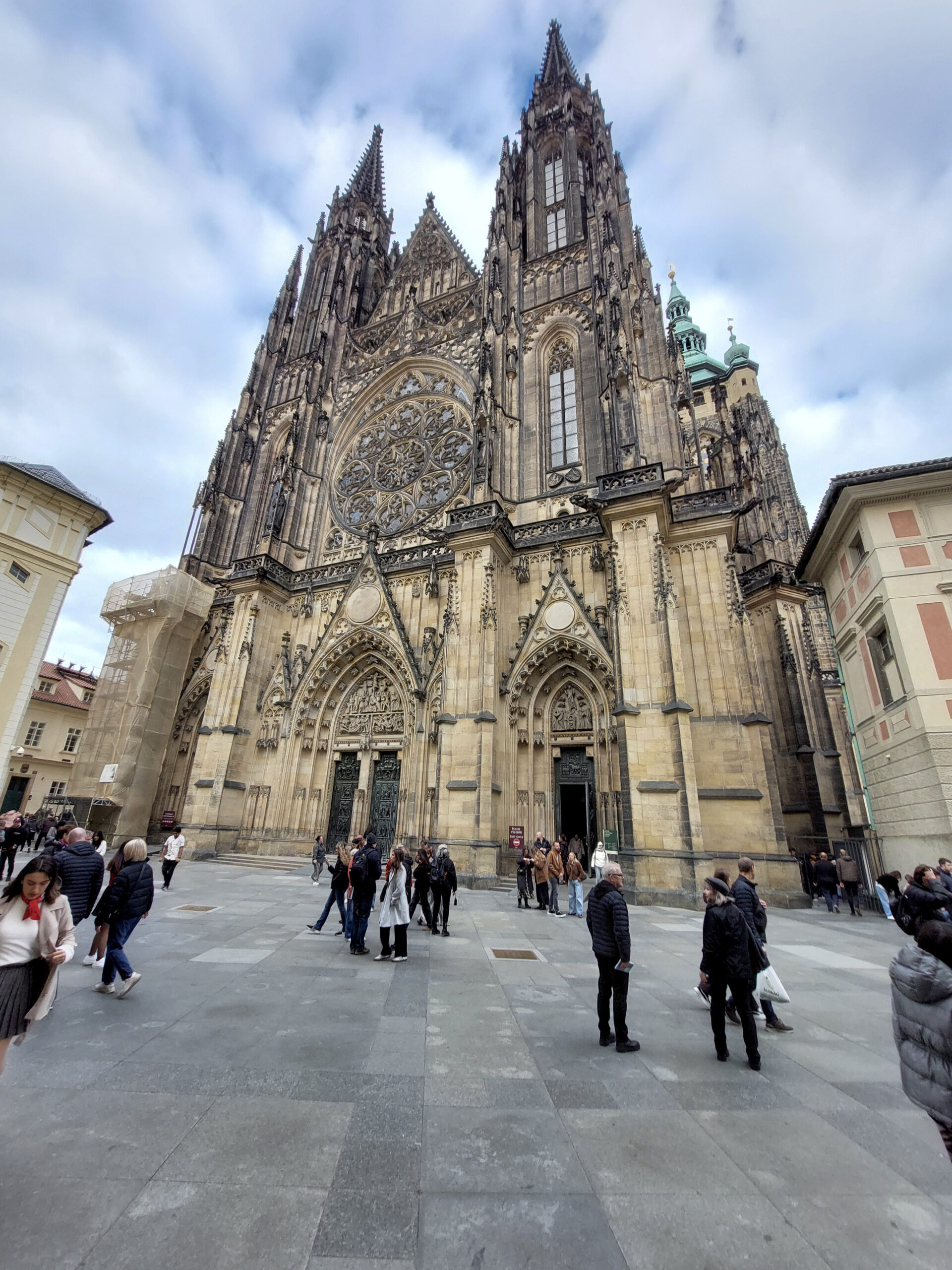
St Vitus Cathedral in Prague gives that decision some substance. The photograph climbs from grey paving and scattered visitors to an elaborate facade, a large rose window and two pointed towers. Carved figures, narrow openings and tracery crowd the stonework. Darker weathered surfaces contrast with pale sections below, while green-patinated roofing appears behind the right side. Blue sky and loose cloud surround the upper towers. At the left, scaffolding partly conceals the building; at ground level, people talk, walk and look in different directions. A small preview can communicate the tall silhouette. A larger view allows us to examine the ornament and the people. Those are different viewing tasks, and they justify different image sizes.
First, separate pixel dimensions from file weight. The copy in this site’s media library is 1920 pixels wide and 2560 pixels tall, with a file size of about 907 kilobytes. The dimensions describe how many pixels the image contains; the file size describes how much data is stored in that particular file. Two images with matching dimensions can have different file sizes because their content and encoding differ. So “make every photograph 200 kilobytes” is a fairly blunt instruction. It says nothing about the picture’s dimensions, intended display or how much visible damage was needed to reach the target.
For a thumbnail, I care about recognisable subjects and useful composition. I do not expect to inspect every carved figure above the cathedral doors. For an enlarged view, I want the detail to reward opening it. A downloadable file for print is another requirement again and deserves a separate, clearly labelled option where it is offered. Making one enormous file do all three jobs is convenient for the publisher and potentially expensive for the person browsing. Making one tiny file do all three simply transfers the disappointment to the larger view.
As a starting example, a preview displayed at about 300 CSS pixels wide might benefit from a version around 600 image pixels wide on a screen using two device pixels per CSS pixel. That is an illustration, not a universal export rule. Actual requirements depend on the layout, screen density and purpose of the image. A large viewing panel needs its own assessment. Responsive image delivery lets the browser choose among supplied versions using information about their sizes and the space the image will occupy. The important editorial result is straightforward: a small browsing tile need not fetch the same file as a large inspection view.
I would also keep aspect ratio separate from resolution. Our cathedral image is vertical, with a width-to-height ratio of three to four. Reducing its pixel dimensions proportionally preserves that shape. Turning it into a square requires cropping or fitting the full image inside a square area with unused space around it. More pixels will not bring back a spire removed by the crop. Before blaming a gallery’s image quality, check whether its layout has discarded the very detail you hoped people would see. Our guide to media gallery layouts explores those choices in more detail.
Compression needs an actual photograph and an actual comparison. Architectural detail, foliage, fine hair, lettering and smooth skies can reveal different problems as compression becomes stronger. With this cathedral, I would inspect the tracery, the edges of the towers and the transitions in the sky at the intended viewing size. If the stone starts looking smeared or distinct edges acquire distracting artefacts, the smaller file has a visible cost. Keep the original, export alternatives and compare them. The best setting is not necessarily the one that wins a numerical competition with another photograph of entirely different content.
File format is part of that experiment. JPEG, WebP and AVIF can all be relevant to photographic delivery, depending on what the publishing system and viewers support. Rather than treating a format name as a quality guarantee, compare the actual output your system produces. For a small publisher, a dependable automatic workflow may be more sustainable than manually producing a dozen versions of every upload. Still, inspect representative results. Automation is perfectly capable of making the same unfortunate choice across an entire archive.
The page also needs to give each picture a stable place to appear. Providing image dimensions allows the browser to reserve space in the correct proportions before the file finishes loading. That helps prevent the caption you are reading from suddenly jumping down the screen. For longer collections, images farther down can be loaded as they approach the viewing area rather than all arriving immediately. But the main picture visible at the top should not be delayed unnecessarily by the same treatment. These are implementation details with very ordinary consequences: less waiting, less page movement and fewer accidental taps.
A rough total is revealing. Forty images averaging one megabyte each represent about forty megabytes of image data if every one is fetched, before counting other page resources. Smaller previews and deferred loading can change what a visitor actually downloads, so the gallery’s behaviour matters as much as the number of files in its collection. I would test a real page from a fresh visit on a phone, rather than judge it only after repeated views on a fast connection. A collection can feel brisk on the computer that has already seen everything.
My practical sequence would be to preserve the original, choose the display layout, supply appropriately sized previews and larger views, then inspect both picture quality and loading behaviour. Try the detailed cathedral, a darker scene, a smooth sky and a busy crowd. Read the captions while images arrive. Open and close the larger view. Check whether zooming provides more information or merely enlarges an already small file. The goal is a coherent experience, not a particular collection of export settings.
Useful titles, captions and alternative text still matter, but they do not compensate for unreadable pictures. Nor does a large, sharp file compensate for a gallery that is difficult to navigate. Our article on organizing a media gallery looks at the information around the images, while the photo selection guide considers which frames deserve to arrive at all. There is an especially effective performance improvement available before compression: leave out the photographs that add nothing.
For the cathedral, I want two pleasures to remain available. A quick glance should reveal the building’s height and the small scale of its visitors. Opening the image should let me linger over the stonework. I do not need the biggest possible file at every step, and I certainly do not want a tiny preview pretending to be a detailed photograph. Give the picture enough room and enough pixels to do the job in front of it. The rest can stay safely in the archive until someone needs it.