My first instinct with a sunset photograph is to put it on a dark background. It feels almost self-evident: dim the room, let the light in the picture do its work. Then I try a pale background and sometimes prefer that instead. The image acquires a clearer edge, the page feels easier to read, and the dark foreground becomes something I look into rather than something that disappears into its surroundings. Choosing an image gallery background turns out to involve more looking and less certainty than the theme previews suggest.
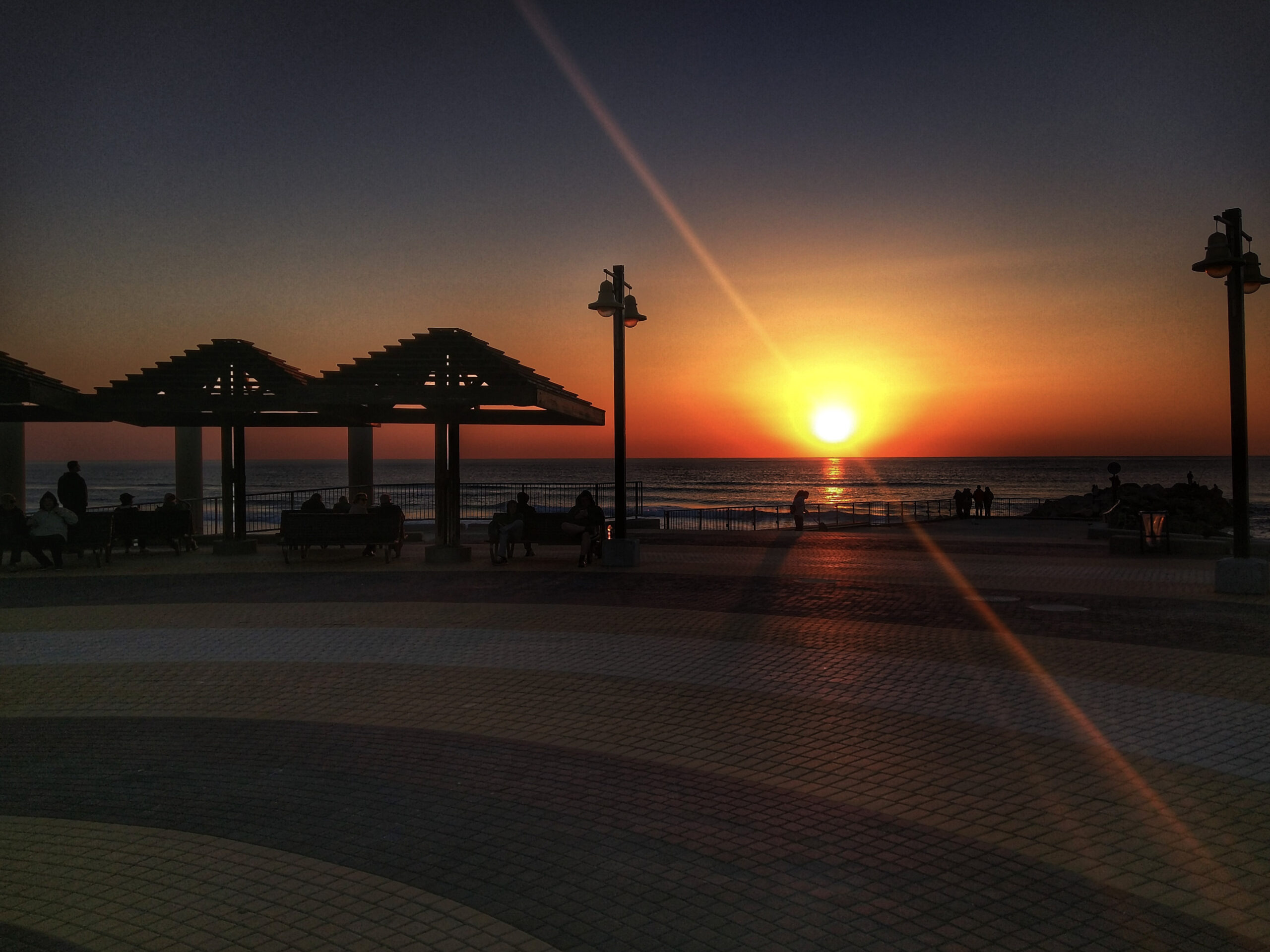
This seafront photograph makes a useful starting point. The sun hangs just above the horizon, a brilliant white centre surrounded by yellow, orange and a narrow reddish band above the water. A bright reflection reaches towards the shore. Across the left side, open timber shelters form a row of dark triangular roofs, with people sitting on benches beneath them. Double-headed lamps rise against the sky. Other figures gather near the railing or stand farther down towards the sea. In the foreground, curved bands of paving spread across a broad promenade. A diagonal streak of flare crosses the frame, passing through the light and continuing towards the lower right. There is a great deal of darkness here, but it contains the architecture and activity that make this a particular evening rather than simply a bright disc over water.
A black image gallery background would place that darkness beside more darkness. I can see the appeal: the sun could feel especially luminous, and the page would avoid a large bright surround. But I would check whether the photograph’s boundary remains clear and whether I still attend to the paving, benches and silhouettes. My preference would depend on the actual display, not on a claim that sunset photographs always belong on black. The photograph is already dramatic. Its surroundings need not make an additional speech.
White offers a different presentation. It clearly separates the rectangular frame from the page and can sit naturally alongside an essay or substantial captions. For this image, I would want to check how the pale surround feels beside the dark foreground, especially on a bright screen. A large field of white may draw more of my attention than I want. On another page, that same clear separation might be helpful. A neutral grey is worth trying between the extremes, particularly when a collection mixes dark interiors, bright landscapes and portraits. It may provide a useful compromise without announcing itself as a stylistic decision.
These are viewing judgements, not edits to the photograph. The same file can appear within several surrounds, and the useful exercise is to compare them while leaving the image itself alone. Keep its displayed size constant, try light, mid-grey and dark backgrounds, and look at more than the brightest area. In this frame I would inspect the people beneath the shelters, the horizon and the paving at the bottom. Then I would read the caption. A background that flatters the picture but makes its accompanying text unpleasant to read has solved only part of the page.
I am more cautious about strongly coloured surrounds. A deep blue page may seem an obvious partner for a seascape, while an orange accent may echo the sunset, but the gallery can quickly begin to feel as though it has taken sides within the photograph. That can be effective in a deliberately designed editorial feature. Across a varied image gallery, a quieter background usually seems easier to live with. I would reserve a strong colour for a clear purpose and test it against photographs that do not share its palette. Otherwise, the design works beautifully until the next upload.
Spacing matters at least as much as colour. Put photographs tightly together and they become a single, busy field. Leave more room and individual frames become easier to consider separately, though the collection takes longer to move through. Neither approach is automatically more sophisticated. A compact archive overview benefits from showing a useful range quickly. A short, carefully sequenced essay may reward a more generous rhythm. Our guide to creating an image gallery starts with that editorial purpose before choosing the presentation.
With the sunset photograph, I would avoid placing another equally emphatic sunset immediately beside it unless comparison were the point. Two bright suns compete rather insistently. A quieter neighbour could make the silhouettes and public space here easier to notice. Space between images gives the eye a pause, but it cannot entirely repair a repetitive selection. If every frame offers the same orange horizon, more padding may simply make the repetition longer. Our article on choosing photographs considers what each addition needs to contribute.
The gap between a picture and its caption should also make their relationship obvious. A caption drifting halfway towards the next photograph can become ambiguous, especially when the page narrows on a phone. I prefer the caption close enough to belong clearly to its image, with a more distinct separation before the next item. Read the sequence without relying on your knowledge of the files. If it is possible to attach the wrong words to the wrong frame, the spacing needs attention. This is a small design decision with a practical consequence.
Borders can help define an image against a similar background, but they should earn their place. A thin, unobtrusive edge may be useful when a pale sky meets a white page or a dark picture meets a dark surround. Decorative frames and pronounced shadows introduce another visual object around every photograph. Sometimes that is the intended style. For this promenade, I would start simply and see whether the image needs any help at all. The shelters, lamps and curved paving already give the frame plenty of structure.
Page width is another form of spacing. An image can be displayed so widely that the viewer has difficulty taking it in as a whole, or so narrowly that its smaller details lose their purpose. This picture needs enough room for the people and the patterned foreground to register, while keeping the horizon and shelters connected. I would compare a comfortable article-width view with a larger viewing option. The larger version should offer a reward in detail, rather than merely occupy more screen. Our guide to image sizes covers the relationship between display space and the file delivered.
Then look at the page on a phone. Generous desktop margins may become wasted space if they leave the photograph squeezed into a narrow strip. A caption that seemed discreet on a large display may be difficult to read at the smaller size. Dark and light viewing modes can also change the surrounding page, so check what happens to borders, text and controls in the versions your site actually offers. An image gallery should remain understandable when it leaves the editor’s favourite screen.
I would test the background with a small, varied group rather than decide from this sunset alone. Include a bright photograph, a dark one, a portrait and something with fine detail. Keep the same spacing initially, change only the background, then compare the spacing separately. That makes it easier to recognise which choice is helping. The best result may be wonderfully undramatic: a page whose background you stop noticing because the photographs and their captions are doing the work.
For this seafront scene, I would begin with a restrained neutral surround and enough room to see the complete frame. I want the sun to catch the eye, but I also want the benches, the small figures and those broad curves of paving to remain available. They are why I linger. The background and spacing have succeeded when they make that lingering comfortable. The sunset can handle the spectacle by itself.