A media gallery is an organized collection of photographs, videos, audio recordings or other media presented so people can browse, view and understand them. On a website, that might be a page of photographs that open at a larger size, a collection of event videos, or an exhibition combining pictures, recordings and explanatory text. It can be modest. Twelve photographs and a few good captions are quite enough. The interesting question, to my mind, is what makes someone stop browsing and start looking.
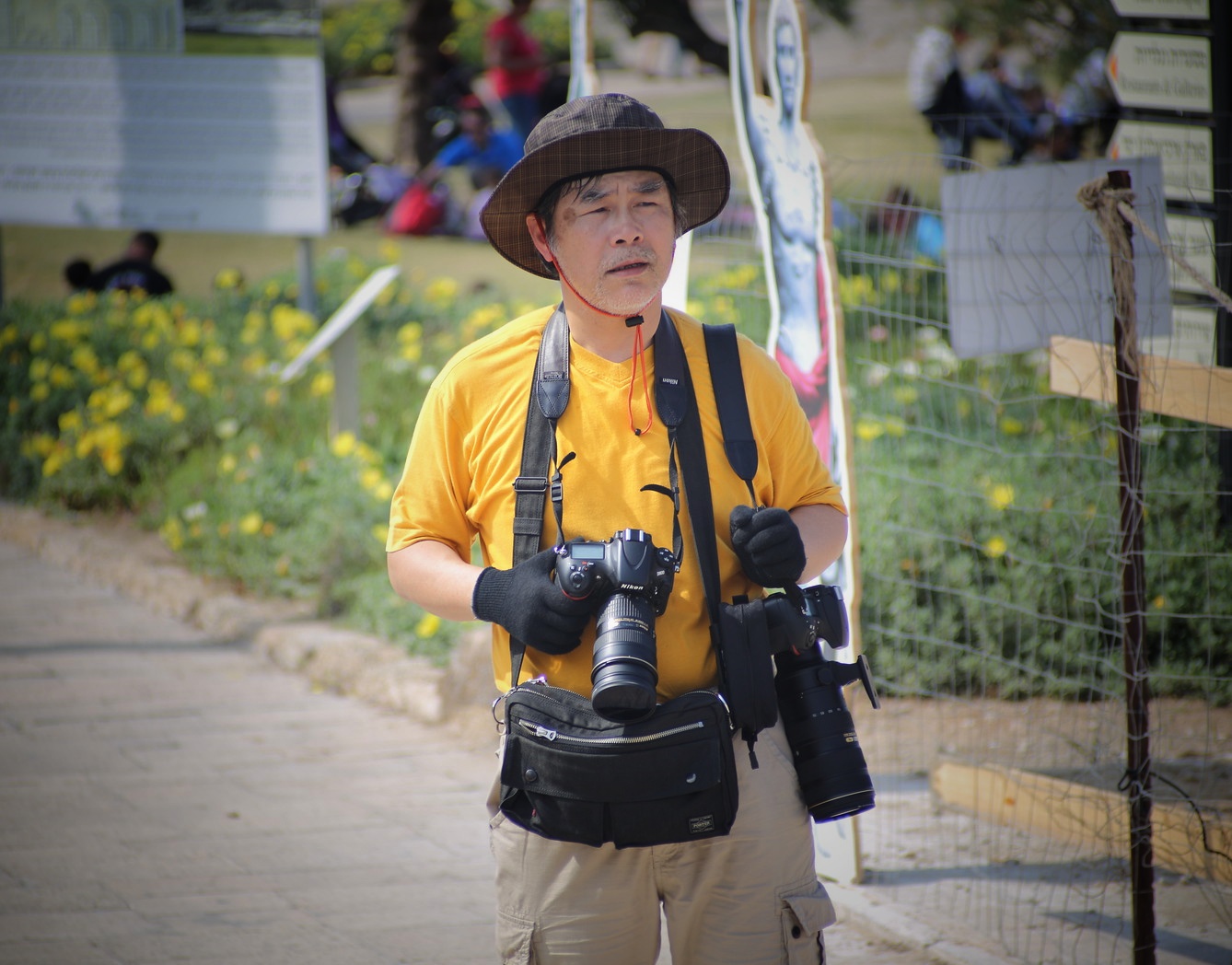
The photograph here is a good place to begin. A man stands on a sunlit path in a bright yellow T-shirt, beige cargo shorts and a soft brown checked hat, its red chin cord hanging loose against his chest. Black camera straps run down from his shoulders. He holds one Nikon camera in a gloved hand, with a substantial zoom lens pointing toward the ground; a second camera with another long lens hangs at his side. A black waist bag completes an arrangement that looks prepared for almost anything, except perhaps travelling light. Behind him, yellow flowers echo the colour of his shirt. A wire fence, pale signs, a wooden post and softly blurred visitors fill out the scene. He is looking beyond the frame, apparently attending to something we cannot see. I like that unfinished feeling. Here is someone ready to make pictures, caught inside somebody else’s.
Put this photograph in a collection about camera equipment and the two bodies and lenses become the obvious subject. Place it among portraits of people pursuing their hobbies and the clothing, expression and sheer commitment take over. Include it in a sequence about a public garden and it becomes part of the visitor experience. The photograph stays the same; its neighbours change how we read it. That is one of the most useful things a gallery can do, and one of the easiest to overlook when uploading a batch of files.
A photo gallery contains still images. A media gallery is a broader term and can include moving images, sound and supporting material, although plenty of perfectly legitimate media galleries contain photographs alone. A museum might pair an object photograph with a recorded explanation. A conference gallery might combine speaker portraits, demonstration clips and views of the exhibition floor. A family collection might put a short recording of a familiar voice beside an old portrait. There is no obligation to collect every format. Adding a video simply because the software has a video button is a rather thin editorial reason.
It also helps to distinguish the public gallery from the media library behind it. A media library is usually where files are stored and managed: originals, alternate crops, unused uploads and all the bits that accumulate during publishing. The gallery is the selection offered to a viewer. Think of the library as the shelves in the back room and the gallery as the exhibition you have actually hung. The back room can be gloriously untidy, though you will eventually pay for that. The exhibition needs a reason for its arrangement.
Different galleries serve different purposes, which is why I am suspicious of a single recipe for making a good one. A photographer’s portfolio should reveal a point of view and make the work easy to examine. A product gallery needs to answer questions about shape, scale, material and details that disappear in a single flattering angle. An event collection should help someone understand what happened, who was there and what the occasion felt like. A press gallery has another job again: supplying usable files with accurate captions, credits and clear information about permitted use. A beautiful page that leaves an editor guessing who is pictured has failed a fairly basic test.
For an editorial collection, I would start by writing one plain sentence about its purpose. “People photographing the world around them” would work for a series built around the man in yellow. That sentence gives you a way to choose. A wider scene could establish the surroundings, this portrait could introduce a participant, and a closer photograph of hands operating a camera could shift attention to the act of making a picture. These are possible additions, not details the existing photograph proves. I would resist padding the sequence with six nearly identical portraits just because all six were sharp. Sharpness is a useful qualification; it is a poor organising principle.
Order matters more than the convenience of upload time suggests. A wide view followed by a close detail asks a viewer to move into a scene. Two photographs with similar colours can establish a visual rhyme, while a sudden change in distance or mood can wake up a sequence that has become too predictable. Our photographer’s yellow shirt and the flowers behind him already create a small echo inside one frame. A neighbouring image could extend it, or deliberately break it. There is room for instinct here. A gallery should not feel as though every photograph has been marched into position by a committee.
Words earn their place when they tell us something the image cannot. A caption can supply a verified location, a date, a person’s name or the circumstances in which a photograph was taken. It should not invent a biography from a hat and two cameras. We can see the equipment in this picture, but we cannot establish the man’s profession, nationality or reason for being there. I would much rather read an honest, limited caption than a confident little story that happens to be made up. Alternative text serves a different purpose: it gives people using screen readers a useful description of the image. “Photographer in a yellow shirt carrying two cameras beside a flower-lined path” communicates more than a filename or a string of repeated search terms.
The viewing experience deserves the same care as the selection. Thumbnails should help people choose what to open, and the larger view should reward them with enough detail to examine the photograph. Faces and important objects should survive the preview crop. Portraits should not lose their heads merely to satisfy a row of matching squares; a surprisingly common indignity. On a phone, the images need comfortable space, readable captions and controls that are easy to use. If a gallery opens in an overlay, viewers should be able to move through it with a keyboard and close it without hunting for a tiny symbol. For video and audio, captions or transcripts help make the material accessible.
Downloads need an explicit decision too. Some galleries exist for viewing, some for distributing material, and some do both. If files are available to download, tell people which sizes are offered and how they may be used. A visible photograph is not automatically free to republish. Equally, a press collection that promises downloadable images should make the actual files straightforward to obtain. I have little patience for a download button that delivers a picture smaller than the preview. Somewhere along the way, the page has forgotten the person using it.
There are examples of selection and context throughout MediaGallery.org. The collection in Technology Conference Photo Gallery gives a specific subject room to unfold across several pictures, while Why I Love Visiting Photography Stores uses photographs within a more personal narrative. Those are two different ways of bringing images together. A gallery can invite quick comparison, or it can slow the reader down and let a story develop between the pictures. Neither requires an elaborate interface.
My own preference is for a media gallery with a recognisable human decision behind it. Someone chose this frame, kept that awkward background because it mattered, left enough space to see the whole picture and supplied the detail a stranger would need. The man with two cameras may have hundreds of photographs waiting on his memory cards. We cannot know. What we can decide is whether this one belongs in our selection, what we put beside it, and what that pairing gives the viewer. That is where the gallery begins to have a voice.