Adobe has completed its acquisition of Topaz Labs, bringing the company’s specialized image and video enhancement technology fully into Adobe’s portfolio. The transaction, reportedly valued at about $340 million, gives Adobe another important piece of technology as it expands its AI capabilities across Photoshop, Lightroom, Premiere and Firefly.
Topaz Labs is best known for improving existing images and video rather than generating entirely new content. Its software specializes in upscaling, sharpening, denoising, stabilization, restoration and other forms of enhancement. That makes the acquisition particularly interesting because generative AI gets most of the attention, while a huge amount of professional creative work still involves improving material that already exists.
For photographers, the obvious example is an older or technically imperfect photograph that can be significantly improved with AI. A low-resolution image can be enlarged, noise can be reduced, detail can be recovered and sharpening can be applied without the photographer having to move the file through several different applications. Adobe can now bring more of these capabilities directly into its existing workflow.
The video opportunity may be even larger. Topaz technology can upscale and restore footage, reduce noise, stabilize video and create additional frames for smoother slow-motion footage. Adobe can potentially integrate those capabilities directly into Premiere, giving editors access to sophisticated enhancement tools without leaving the Adobe ecosystem. This is particularly relevant for archival footage, smartphone video, low-light recordings and increasingly AI-generated video.
Another significant part of the deal is Topaz’s expertise in running AI models efficiently on local devices. Adobe has increasingly emphasized AI that can operate directly on users’ computers rather than relying entirely on cloud processing. Topaz brings years of experience in this area, potentially helping Adobe deliver more powerful enhancement tools with lower latency and without sending every piece of visual content to the cloud.
The acquisition also fits Adobe’s broader Firefly strategy. Firefly is increasingly becoming more than an image-generation system; Adobe wants it to become an AI layer across the creative process. Topaz adds another category to that strategy: instead of simply generating something new, AI can analyze, repair and improve something the creator already has.
Adobe is keeping Topaz Labs as a standalone brand for now, which is important for existing users. Topaz products are not simply disappearing into Photoshop or Premiere. The standalone applications and models are expected to continue, while Adobe integrates the underlying technology into its own products.
The bigger strategic value of the acquisition, however, probably isn’t Topaz Photo or Gigapixel as individual applications. Adobe already has enormous distribution through Creative Cloud. What it is really acquiring is Topaz’s specialized AI technology and expertise. Adobe can take those capabilities and potentially put them in front of millions of Photoshop, Lightroom and Premiere users.
At roughly $340 million, the acquisition is relatively small for Adobe, so the financial impact by itself is unlikely to be the main story. The important question is whether Topaz technology makes Creative Cloud more capable and harder to replace. If Adobe successfully turns Topaz’s enhancement technology into seamless features throughout its creative applications, the value of the acquisition could extend well beyond the standalone Topaz products.
For photographers and video creators, this is therefore a more significant acquisition than the price might suggest. Adobe isn’t simply buying another generative-AI startup. It is adding mature technology for improving real-world visual content, and that could become an increasingly important part of the AI-assisted creative workflow.
AI Upscaling Before and After: A Tiny Couple on a Paris Street Turned Into a Full Portrait
The before shot is a wide-angle frame on rue Saint-Honoré in Paris, late in the day. Shoppers carrying white paper bags, a Cadolle banner hanging off the facade, a Wolford sign further down, and a silver Piaggio scooter parked tight against the kerb in the foreground. It’s a decent street scene. Nobody in it is the subject.
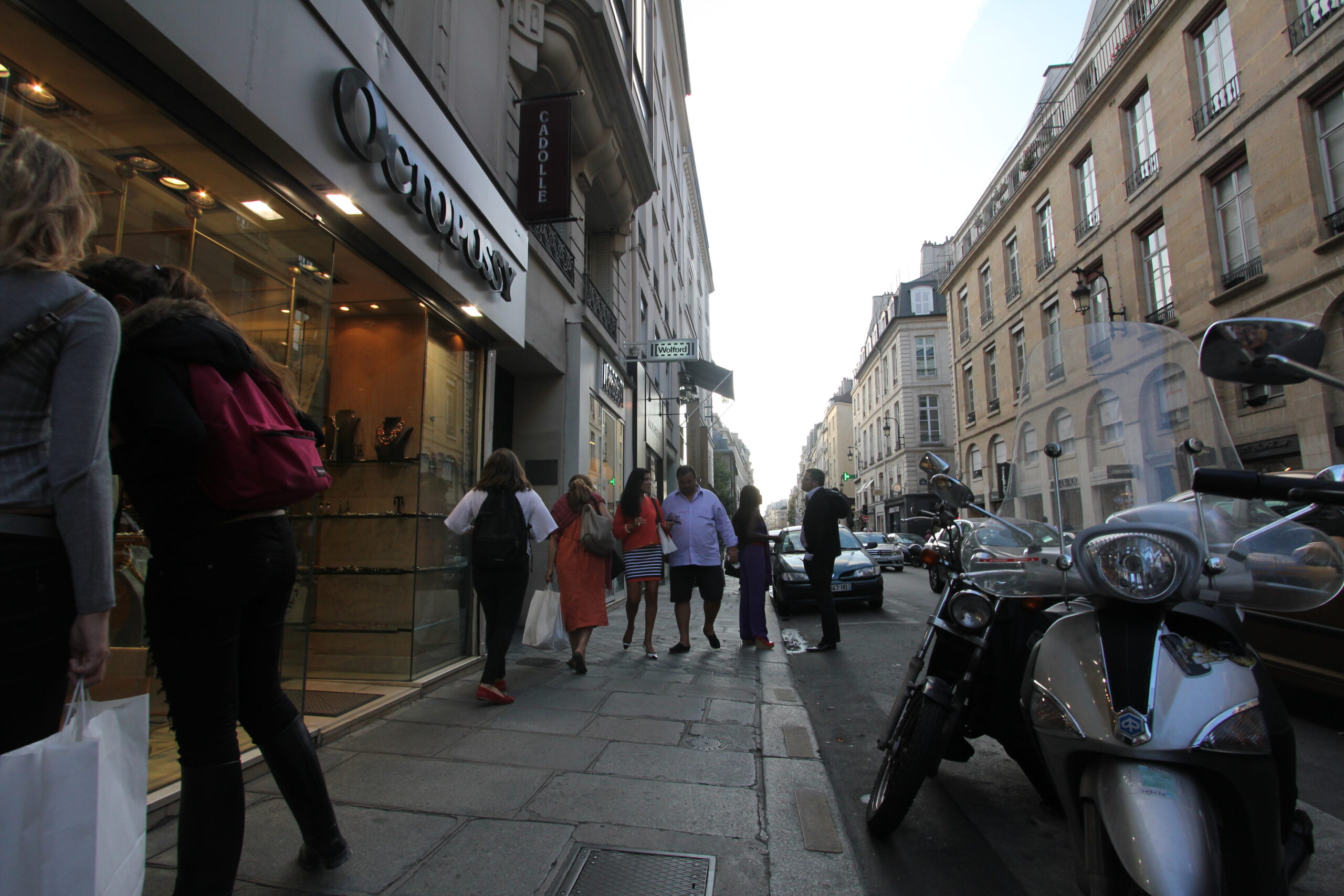
In the middle of the pavement, small, there’s a couple walking toward the camera. She’s in an orange top and a navy and white striped skirt. He’s in a pale blue shirt, dark shorts and flat slip-ons. At full size each face is a few dozen pixels. You can tell they’re talking to each other. That’s about all you can tell.
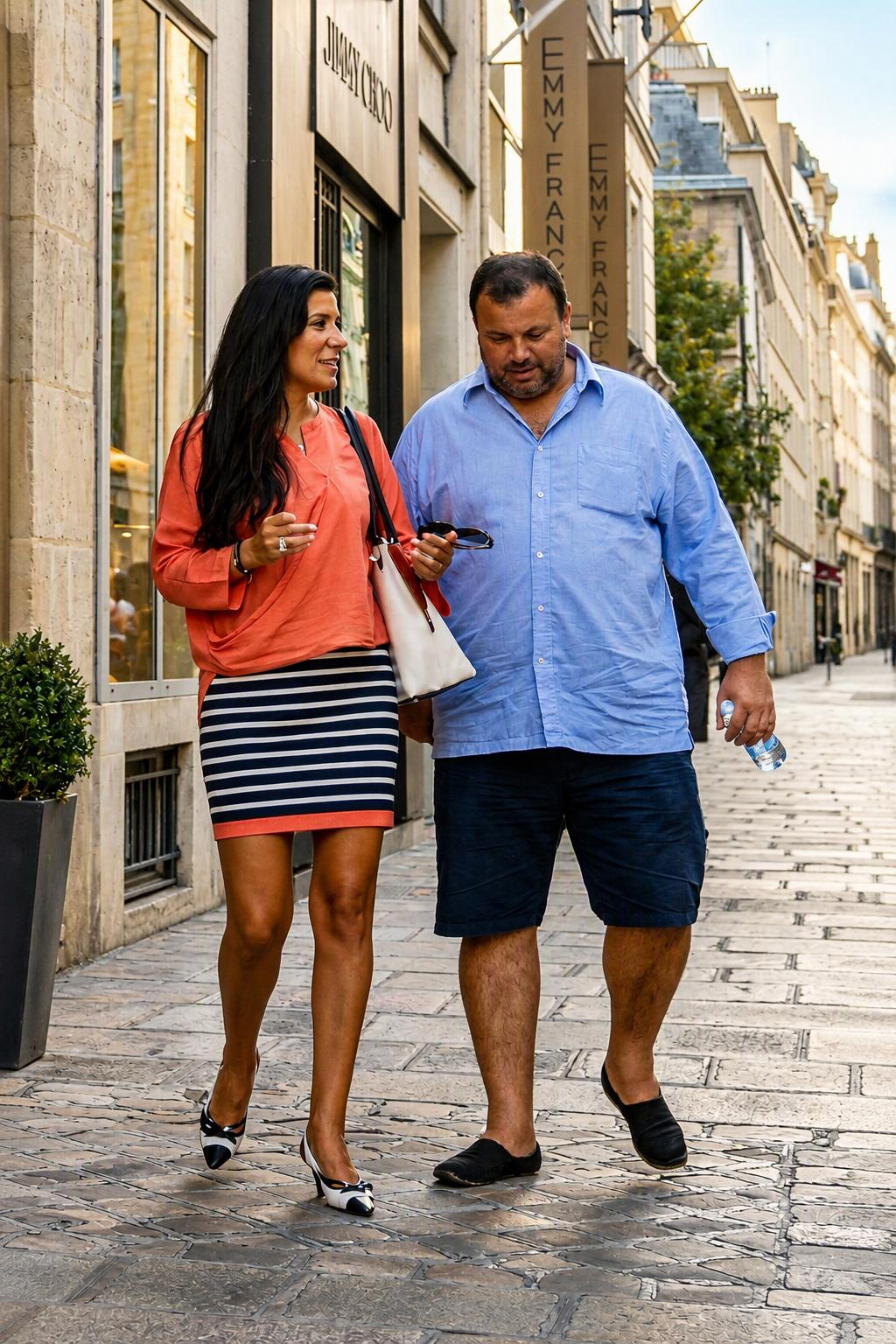
The after shot is those two people, cropped out and run through an AI upscaler into a tall 9:16 frame. And it looks great. Sharp faces, a ring on her finger, every stone in the street picked out, warm light coming in low from the side. Post it on Instagram and nobody asks where it came from.
What the upscaler actually did
Put the two side by side and it gets interesting, because a lot of the second picture was never in the first one.
Faces first. At that size there’s no face to recover. The software looked at a blur, guessed what kind of people usually sit behind a blur like that, and drew them. The results are believable and pleasant. They are almost certainly not what these two people look like.
Then the hands. In the after she’s holding a pair of sunglasses and he’s got a plastic water bottle. Go back to the original and you’d struggle to confirm either one. In the wide frame he looks more like he’s checking something in his hand, maybe a phone.
The street changed too. Behind them in the after there’s Jimmy Choo lettering over a shop window and a tall banner reading “Emmy Franck”. In the original, Jimmy Choo is across the road on the other side of the street, and the banner isn’t in the frame at all. The pavement went from big flat stone slabs to small cobbles. The other shoppers, the woman in purple and the man in the dark suit at the kerb, are simply gone. So is the scooter.
And the light. The original is in shade with a blown-out white sky. The after has a golden-hour glow that wasn’t there when the shutter fired.
Her outfit is the part it got closest. The coral top, the striped skirt with a matching trim at the hem, the two-tone heels. Those colours and shapes were big enough in the original to survive, so the model had something real to work from.
Upscaling or generating?
The word “upscaling” suggests you’re getting more of what was already there. With a small crop like this you’re getting a new picture that agrees with the old one on colour and pose, and fills in everything else.
That’s fine for a lot of uses. A mood image, a social post, a mockup for a fashion page. It’s less fine if anyone treats it as a record of what happened that afternoon. And there’s a quieter question with street photos of strangers: they didn’t pose for this, and now they have faces they never had.
How to check any AI upscale
Zoom the original to 100% on the area you cropped. If a face is smaller than your thumbnail there, whatever face you see in the after was invented. Read the signs, because models happily rewrite shop names and lettering. Count the people. Look at the ground, since paving and cobbles are an easy place for the model to swap in its own idea of “old European street”. And compare the light direction, which tends to get quietly improved.
The after is a nice photo. It just isn’t the same one.